Send OPC UA Values to Azure Event Hubs with Peakboard Hub Flows
With Peakboard Hub Flows, you can send values from OPC UA as events to Azure Event Hubs, and with a Peakboard application, you can receive and display these events.
04.11.2026
·
6 min read
- Azure Event Hubs is a service for ingesting large data streams in real time, often used for telemetry and sensor data in factories.
- A Hub Flow can send events to an Event Hub, and a Peakboard application can receive events.
- In the example, every new OPC UA value from two light barriers triggers the Hub Flow.
- On the Azure side, you need an Event Hubs namespace with an access policy and a storage account.
The example uses the counters of two light barriers.
Azure Event Hubs and Peakboard
Azure Event Hubs is a Microsoft service that ingests large data streams in real time, such as logs, clickstreams or IoT signals. In factories, it often collects telemetry and sensor data from machines. Microsoft explains the basics in its introduction to Azure Event Hubs.
With Peakboard, there are two roles:
- Event publisher: A Hub Flow sends events to an Azure Event Hub.
- Event consumer: A Peakboard application receives selected events from an Azure Event Hub as soon as they arrive.
Preparation in Azure
1. Create an Event Hubs namespace
First, you can create an Event Hubs namespace. A namespace groups one or more Event Hubs, including the one used in this example. For access from Peakboard, you can create a new policy with the “Manage” permission under “Settings” › “Shared access policies” and copy its connection string.
2. Create a storage account
Next, you can create an Azure storage account. Under “Security + networking” › “Access keys”, you’ll find the connection string that you need later for the Event Hub data source. The storage account holds the offsets of the Event Hub’s partitions. For each partition, they record the position of the latest event.
Event Hub data source in Peakboard Designer
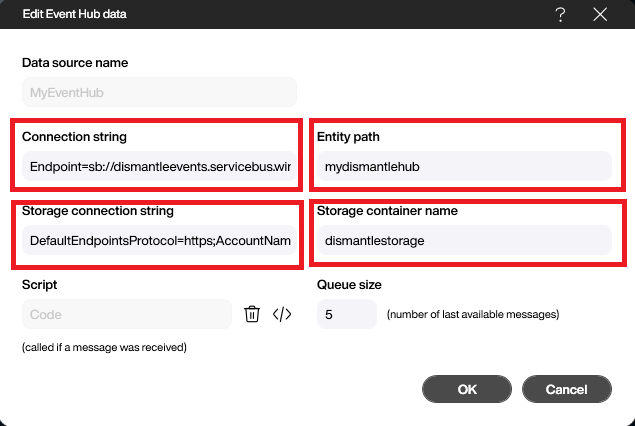
Both projects, the Hub Flow and the application, start with an Event Hub data source, called MyEventHub in the example. There, you can enter the connection strings of the Event Hub and the storage account and the names of the Event Hub (“Entity path”) and the storage container (“Storage container name”). The Peakboard help article on the Azure Event Hub data source explains all its settings.
Hub Flow as event publisher
1. Create the OPC UA data source
In the OPC UA data source MyMachine, you can select “Subscriptions” as the “Communication type” and “Last message (simple)” as the “Message type”. Then you can subscribe to two nodes, one for each light barrier counter. Each counter records how many goods have passed its light barrier, so the data source returns two columns, LB1Count and LB2Count. You can find out more about OPC UA in Peakboard in the article OPC UA with Peakboard and on the OPC UA data connection page.

2. Build the Hub Flow
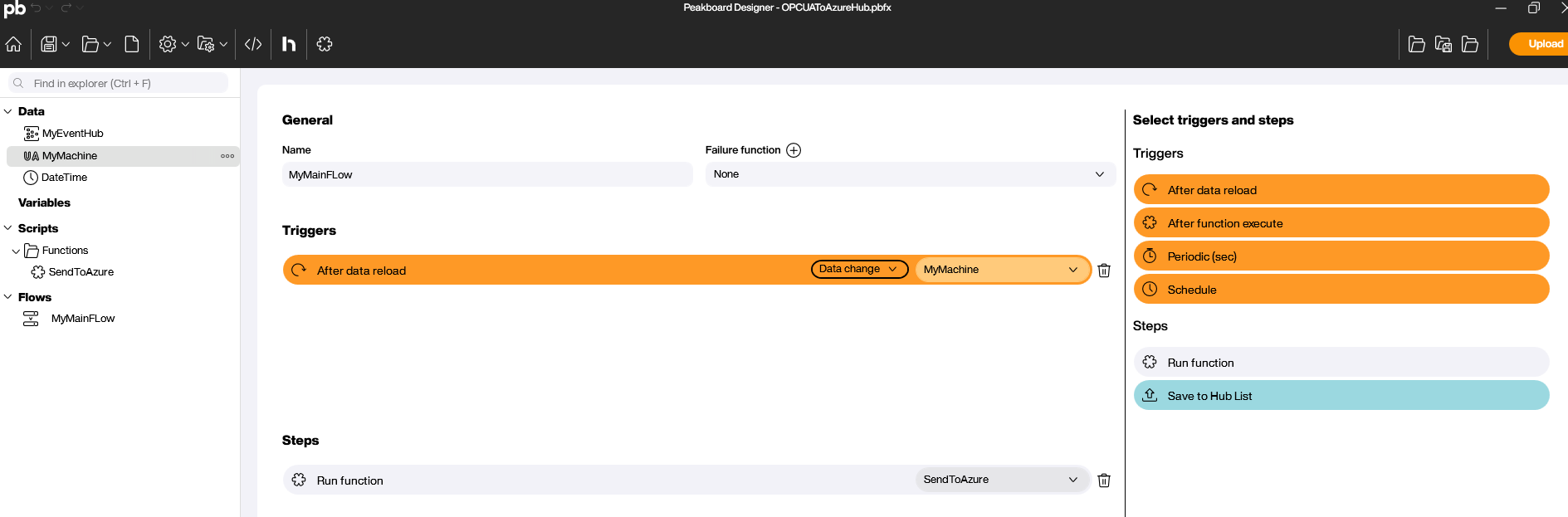
As the trigger, you can choose “After data reload” with the condition “Data change” on the MyMachine data source. Whenever one of the two counter values changes, the Hub Flow starts and calls the function SendToAzure.
3. The SendToAzure function
The function calls sendevent, a function provided by the Event Hub data source. It takes two parameters:
- The message, here a JSON string with the two counter values. The function reads
LB1CountandLB2Countfrom the first row ofMyMachineand puts them into the fieldsLightBarrier1andLightBarrier2. - Properties with metadata for the message. In the Event Hub, they can be used for message routing, for example. The property
SendBywith the valuePeakboardis only there for demonstration purposes.
This is the complete script:
--Create message properties (optional)
local props = {}
props.SendBy = 'Peakboard'

local message = '{ "LightBarrier1": ' .. data.MyMachine.first.LB1Count
      .. ',"LightBarrier2": ' .. data.MyMachine.first.LB2Count .. '}'

data.MyEventHub.sendevent(message, props)
After the upload to Peakboard Hub, the Hub Flow runs right away and sends every value change of the light barriers to the Event Hub.
Peakboard application as event consumer
In the application, you can subscribe to the light barrier events in the Event Hub and display the counter values, which update with every new event. Here, too, the Event Hub data source MyEventHub is the starting point. It returns a table with the columns Timestamp and Message. The “Queue size” parameter sets the maximum number of rows, 5 in the example. You can process the data with standard patterns such as a reload event or a dataflow.
Alternatively, you can use the field “Script (called if a message was received)” in the data source. This script runs for each incoming message, and you can build its logic with Building Blocks. In the example, the script reads the values LightBarrier1 and LightBarrier2 from the message via a JSON path and assigns them to the text blocks txtLB1 and txtLB2. If an error occurs, they show #ERROR#. This keeps the logic open for later extensions, such as reacting to additional properties in the message.

The result
The light barrier values travel via OPC UA to the Hub Flow, from there to the Event Hub and on to the Peakboard application. The application shows the raw data in a table bound to the data source and the processed values in two text blocks.

Further reading
You can download the Flow project OPCUAToAzureHub.pbfx and the application AzureEventHub.pbmx and open them in Peakboard Designer.
Free trial
Try Peakboard Hub for free
Hub Flows are included without limits in the 60-day Peakboard Hub trial, so you can rebuild the example from this article right away.

What is Azure Event Hubs?
A Microsoft service that ingests large data streams in real time, such as logs, clickstreams or IoT signals. In factories, it often collects telemetry and sensor data from machines.
What role does Peakboard play?
A Hub Flow can send events to an Event Hub as an event publisher. A Peakboard application can receive and display events as an event consumer.
What do I need on the Azure side?
An Event Hubs namespace with an Event Hub and an access policy with the Manage permission, plus a storage account for the offsets. You need the connection strings of both.
When does the Hub Flow send events in the example?
With every change to the two counter values. The trigger “After data reload” with the condition “Data change” on the OPC UA data source starts the Hub Flow, which then calls the SendToAzure function.
How can I receive events from Azure Event Hubs?
With a Peakboard application that uses an Event Hub data source. The application receives the subscribed events as soon as they arrive, and the data source returns them as a table with the columns Timestamp and Message. Optionally, you can add a script in the field “Script (called if a message was received)”, which runs for each incoming message.