Revolutionary technology: Why low-code and no-code will dominate software development
“Low-code no-code isn't just a trend, it's a revolution that will fundamentally change the way we build and use software.” — Satya Nadella, CEO of Microsoft. In today's fast-paced business world, companies face the challenge of reacting ever faster to market changes and customer requirements. That calls for flexible, agile development processes, which conventional programming often cannot deliver quickly enough. This is where low-code and no-code application development platforms come in, and they are increasingly becoming the standard in software development. But what exactly do these terms mean, and what advantages do they offer?
01.08.2024
·
5 min read

- No-code needs no programming at all; low-code needs minimal code.
- Both speed up application development considerably.
- Artificial intelligence drives the trend even further.
- This lets business departments build their own applications, independent of IT.
Low-code vs. no-code
What is the difference between low-code and no-code?
Coding: No-code actually requires no programming at all, while low-code requires at least a certain amount of coding. That distinction makes no-code particularly attractive for users with no programming skills, while low-code lets developers build applications with minimal programming effort. Graphical user interfaces and drag-and-drop tools make it easy to assemble the components.
Target groups: No-code platforms are designed for a wide audience, ranging from non-technical staff to expert users. Low-code, by contrast, is often aimed at professional developers or tech-savvy users who have specific requirements and sometimes write parts of the code themselves.
Technical understanding: No-code solutions require no technical understanding, which makes them particularly accessible. Low-code platforms, on the other hand, require at least basic programming knowledge and technical know-how.
Susceptibility to errors and bugs: Since no-code solutions are based entirely on prefabricated modules, they are generally less susceptible to errors and bugs. On low-code platforms, where you bring in your own code, more errors can potentially occur.
Security vulnerabilities: No-code solutions usually offer a smaller attack surface, as the user adds no code of their own. With low-code, by contrast, custom coding can open up more security gaps.
Speed and resources: A significant advantage of both is the drastic reduction in development times. Using low-code and no-code platforms, a project can be completed five to twelve times faster, which means lower staffing and budget requirements.
Examples of low-code and no-code platforms
Examples of common platforms that combine low-code and no-code approaches and simplify the development of applications and automations:
- Microsoft PowerApps: A platform that lets users build custom business applications by integrating and customising various data sources.
- Make and Zapier: Automation platforms that make it possible to connect various web applications and create workflows without programming knowledge.
- Peakboard Designer: A platform for capturing, evaluating and presenting process data and for building interactive dashboards. It integrates seamlessly with over 100 data sources such as SAP, machine controllers, material flow controllers or Excel.
- Microsoft Power Automate: An automation platform that makes it possible to automate repetitive tasks and workflows by connecting various applications and services.
- Airtable: A flexible, easy-to-use tool that combines spreadsheets with database capabilities to create custom applications and workflows without any programming skills.
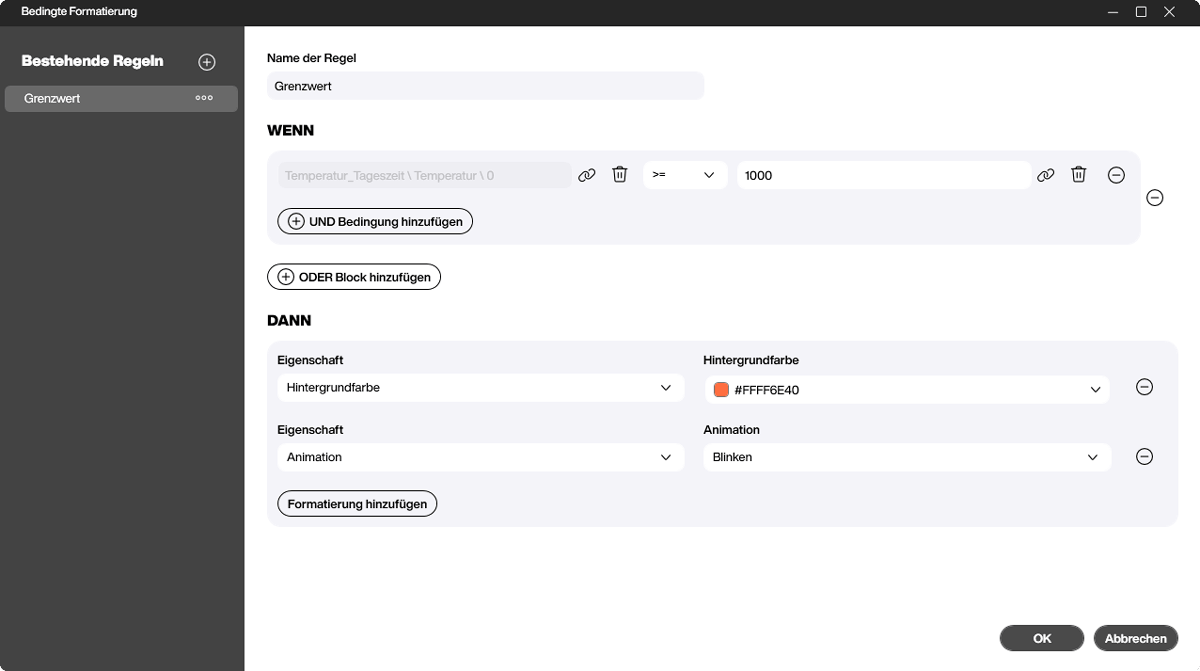
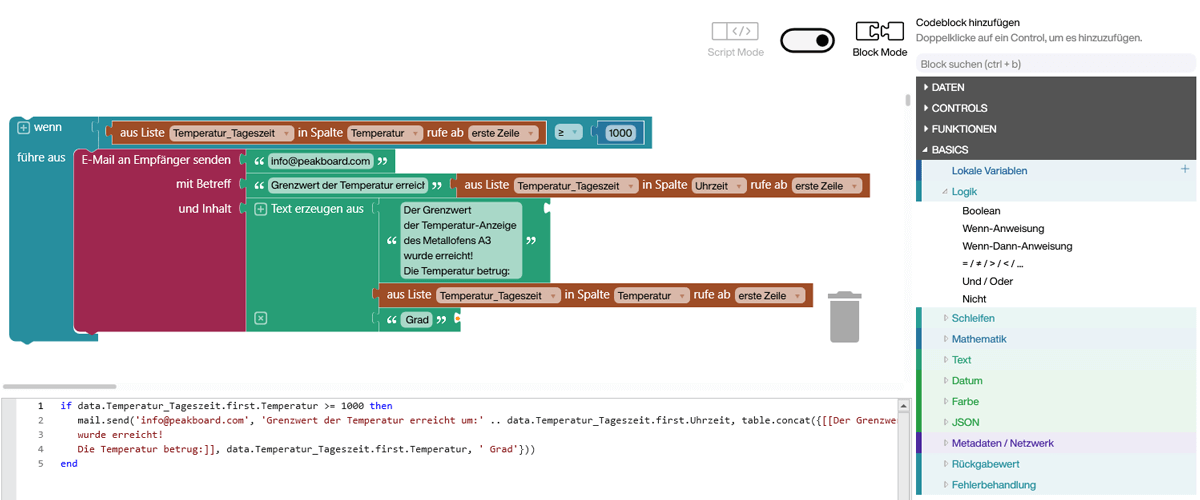
How artificial intelligence puts low-code and no-code into overdrive
Integrating artificial intelligence (AI) into low-code and no-code platforms lifts these technologies to a new level of performance and simplifies application development considerably. AI benefits in turn from the continuous development of its own capabilities. Here are a few examples of how AI is used in these platforms:
Automated code generation: AI algorithms can generate and optimise code automatically, based on the user's inputs and requirements. That drastically reduces manual programming effort and minimises sources of error.
Smart recommendations: AI can suggest to developers and users which modules or components are best suited to particular tasks. That shortens development time and increases efficiency.
Natural language processing (NLP): With NLP, users can create applications through simple voice input or text-based commands. That makes the platforms even more accessible, particularly for non-technical staff.
Automated testing and debugging: AI helps to create and run tests automatically, ensuring that applications are free of errors. That speeds up the development process considerably and increases the reliability of the applications created.
The importance and transformation of application development
Application development has changed decisively and offers companies a range of benefits:
Democratising software development: Low-code and no-code platforms open up the development and adaptation of applications to a wide range of users, including non-technical employees. These technologies promote innovation and agility, because business departments can implement their specific requirements more quickly.
Reduced development times: Traditional software development projects can take months or even years. Low-code and no-code platforms cut those development times drastically, because many standard tasks and processes are already prefabricated and optimised. That acceleration lets companies react more quickly to market changes and bring new products or services to market promptly.
Cost efficiency: By reducing programming effort and allowing non-developers to create applications too, development costs fall significantly. Companies can use their IT budgets more efficiently and free up resources for other strategic projects.
How low-code and no-code improve business processes in companies
Low-code and no-code platforms help companies increase productivity and strengthen their capacity for innovation, by offering several benefits.
- Flexibility and adaptability: Companies can adapt their applications quickly to changing business requirements without relying on extensive IT projects. That increases flexibility and makes it possible to react more quickly to customer feedback and market trends.
- Reduced dependency on IT departments: Since business departments can create applications as well, dependency on overloaded IT departments falls. That takes pressure off IT and allows IT staff to focus on more complex, more strategic tasks.
- Better collaboration and innovation: Low-code and no-code platforms promote collaboration between departments, because application development is no longer exclusively in the hands of IT. This cross-departmental collaboration produces more innovative solutions and a stronger focus on actual business requirements.
- Fast prototyping: Being able to create prototypes quickly and cheaply lets companies test ideas and concepts before implementing them at scale. That reduces the risk of bad investments and supports agile product development.
Frequently asked questions about low-code and no-code
What is the difference between low-code and no-code?
No-code requires no programming whatsoever, while low-code requires at least some code. No-code is therefore aimed more at users without programming skills.
What advantage do these platforms offer?
They speed up application development significantly and let business departments build their own applications without depending heavily on IT.
What role does AI play?
Artificial intelligence speeds up development further by suggesting building blocks and automating recurring tasks.