Digital Operator Guidance: Work Instructions and Machine Data at the Workstation
How digital operator guidance brings work instructions, machine data and feedback together at the workstation.
19.06.2026
·
8 min read
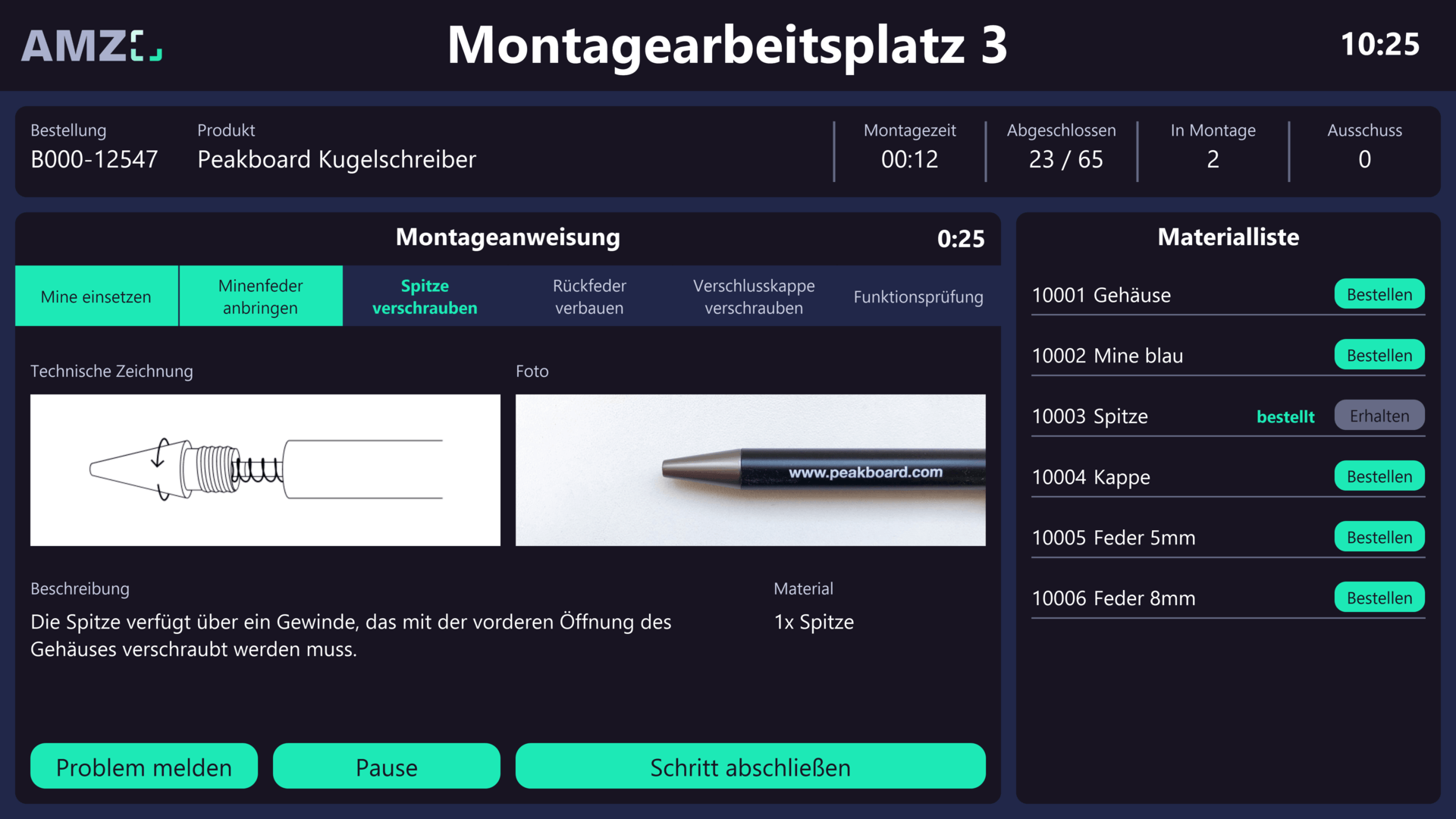
- Digital operator guidance replaces paper travellers and verbal instructions with context-based information directly at the workstation.
- The operator sees exactly what to produce, when and how – and can log feedback, faults and quality data by touch.
- Peakboard connects ERP, MES and machine data without programming into a unified operator interface.
- Result: fewer errors, shorter onboarding times, complete traceability.
Peakboard connects SAP order data, machine drawings and PLC signals on a single touch display at the workstation – giving the operator everything needed for the current order and the ability to write back faults, feedback and quality data directly into the ERP without leaving the line. That is digital operator guidance: no paper traveler, no questions to the foreman, no media break between machine and system.
What is digital operator guidance?
Operator guidance covers all measures that supply the operator at their workstation with the information they need for their task: work instructions, drawings, target quantities, machine parameters, quality specifications. In the analogue world, this information arrives as a paper traveler, a notice board or a verbal instruction. That causes three familiar problems: the information is not always up to date, it is not machine-readable, and feedback only reaches the system with a delay.
Digital operator guidance solves these problems by bringing together ERP order data, MES specifications and machine data in a unified interface at the workstation.
What information does the operator need?
- Order sequence and target quantity from the ERP
- Work instructions and drawings from the DMS or SharePoint
- Current actual quantity and cycle time from the machine or PLC
- Quality specifications and inspection features from the QM system
- Set-up instructions and tool data for the next order
Feedback without a media break
An operator reporting a fault, documenting a quality deviation or confirming order completion should be able to do that directly at the workstation. With Peakboard, a touch dashboard can be built that gives the operator exactly this capability. The digital shift log benefits directly: events captured by the operator appear automatically in the handover documentation.
Practical example: operator guidance in series production
With Peakboard, each workstation automatically sees the next order from SAP, the matching work instruction and the current machine data. Once the order is complete, the operator confirms the quantity by touch – SAP is updated immediately. The shift supervisor sees the current status of all lines on a central shop floor board.
Connection to shop floor management
Digital operator guidance is the data source for all other shop floor systems. An Andon board, a digital call system and the shop floor meeting all depend on current data flowing from the workstation. Introducing digital operator guidance creates the foundation for the entire digital shop floor management.
Solution
Operator guidance with Peakboard
Bring work instructions, order data and machine data together at the workstation – without programming.

What is digital operator guidance?
Digital operator guidance supplies the operator at their workstation with up-to-date work instructions, order data and machine data – combined with the ability to log feedback, faults and quality data directly into the system.
Which systems are connected?
Typically ERP (SAP, Dynamics), MES, DMS (SharePoint), machine controllers (OPC UA, PLC) and quality systems. Peakboard connects these sources via low-code without programming.
What is the difference from a paper traveler?
A paper traveler is static and cannot receive feedback. Digital operator guidance is always current, connects multiple data sources and writes feedback back to the system immediately.