Process SAP Confirmations Asynchronously with Peakboard Hub Flows
With Peakboard Hub Flows, you can send production order confirmations to SAP asynchronously: the confirmation is first stored in a Hub list, and a Hub Flow takes care of sending it, tracking the status and retrying on errors.
04.11.2026
·
5 min read

- A Hub list can act as a message queue for confirmations that a Hub Flow sends to SAP asynchronously.
- The application only waits until the confirmation is stored in the Hub list and can continue right away.
- In the example, the Hub Flow runs every 60 seconds, sends open confirmations to SAP via BAPI and sets the status.
- The Hub Flow retries failed confirmations as soon as the list of open confirmations changes.
The Hub list acts as a message queue. Part 1 of the series on storing MQTT data covers the basics of Flow projects.
What a message queue is
A message queue accepts messages from producers, stores them temporarily and then passes them on to their target. With Peakboard, it works like this:
- A user submits a confirmation for a production order in a Peakboard application.
- The confirmation is stored in a Hub list that acts as the message queue.
- A Hub Flow loops over the confirmations in the Hub list and sends each one to the ERP system.
Why the extra step pays off
The application stays responsive
If a confirmation goes directly to the ERP system, the application has to wait until the system processes it and responds. During that time, the application is blocked. With the message queue, it only takes as long as storing the confirmation in the Hub list, which is very quick. After that, the user can get back to work right away.
Handle failures automatically
If the ERP system is unreachable or a confirmation cannot be processed, for example because the order is blocked, the confirmation should be sent again later. With the message queue, the Hub Flow takes care of this. As soon as the confirmation is in the Hub list, the application's job is done.
Step by step
The starting point is a Peakboard application that currently sends confirmations directly to SAP. The article on production order confirmation with Peakboard and SAP explains how to build such an application.
1. Create the Hub list as a message queue
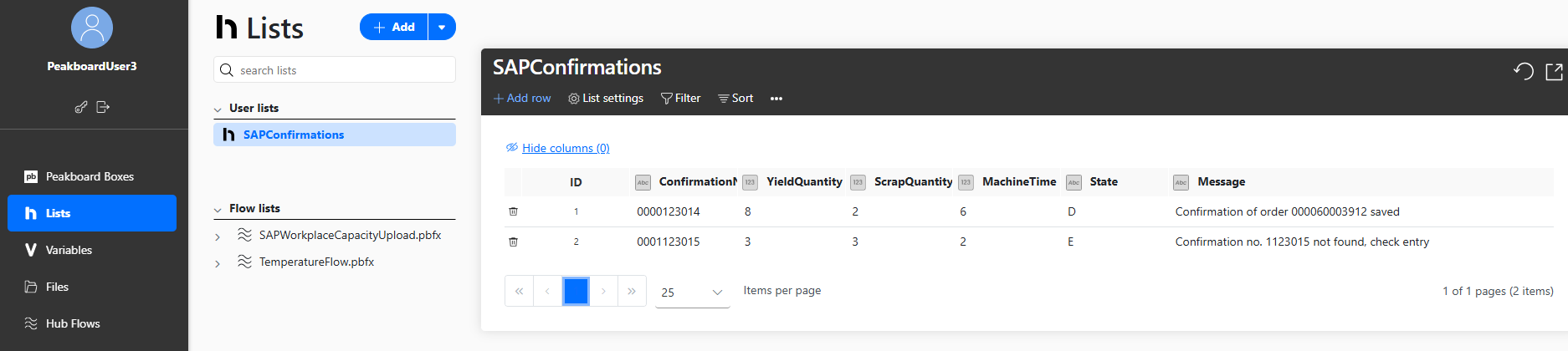
In Peakboard Hub, you can create the SAPConfirmations Hub list with these columns:
ConfirmationNo: confirmation number that identifies the production orderYieldQuantity: quantity of usable piecesScrapQuantity: quantity of scrap piecesMachineTime: machine time usedState: state of the confirmation,N(new),D(done) orE(error)Message: response from SAP once the confirmation has been sent
The Hub Flow uses the last two columns to keep track of which confirmations have been processed and to provide status information.
2. Data source for open confirmations
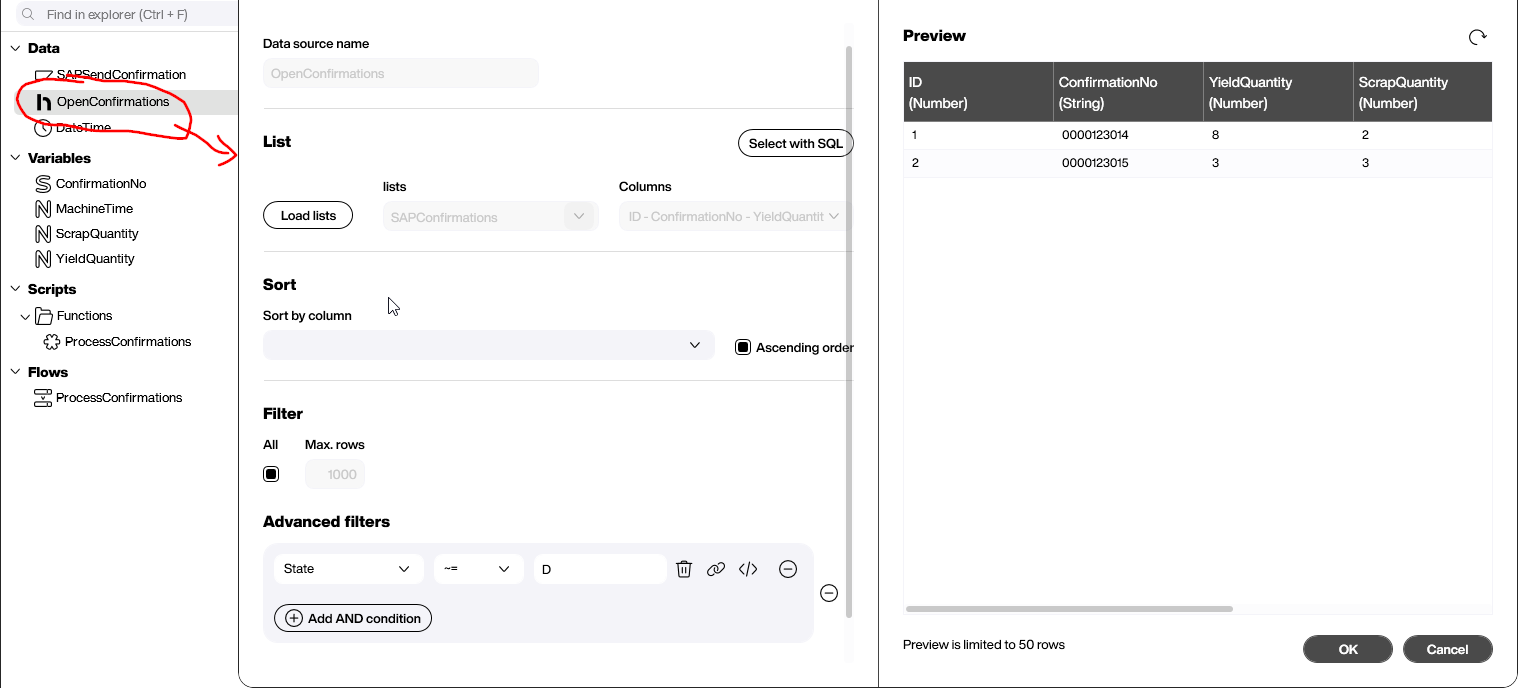
In the new Flow project, you can add the Hub list as the OpenConfirmations data source with the filter State ~= D. The data source then contains all new confirmations (N) and all failed ones (E), exactly the ones that still need to be sent.
3. Variables and SAP data source
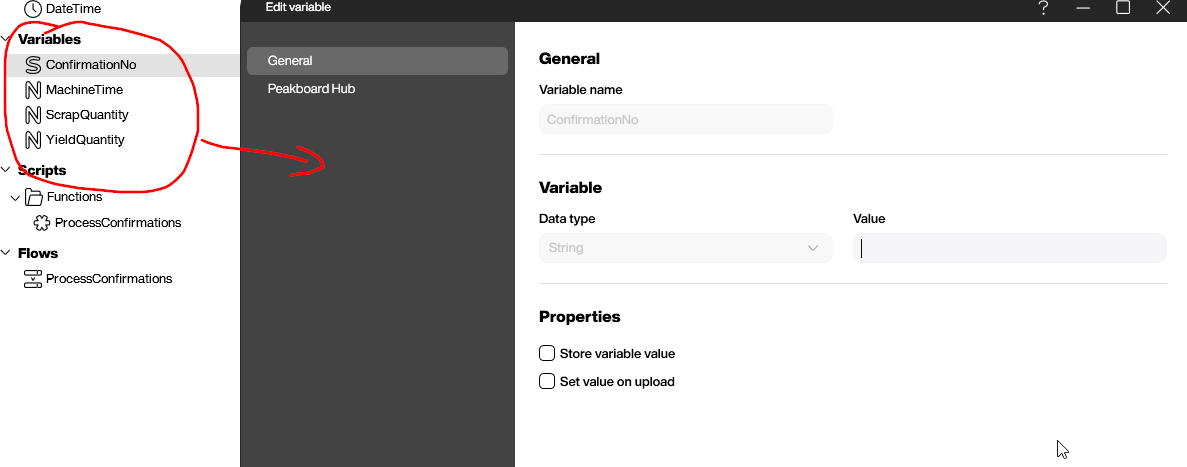
For the XQL statement, you can create four variables: ConfirmationNo with the data type String, and YieldQuantity, ScrapQuantity and MachineTime with the data type Number.
The SAPSendConfirmation SAP data source sends the confirmation to SAP with the following XQL. The #[…]# placeholders take the values of the variables, 'H' specifies the machine time in hours, and 'Submitted by Peakboard' is the confirmation text. The data source also stores the DETAIL_RETURN table with the status and message from SAP.
EXECUTE FUNCTION 'BAPI_PRODORDCONF_CREATE_TT'
   TABLES
      TIMETICKETS = ((CONF_NO, YIELD, SCRAP, CONF_ACTIVITY2, CONF_ACTI_UNIT2, CONF_TEXT),
         ('#[ConfirmationNo]#', '#[YieldQuantity]#', '#[ScrapQuantity]#',
            '#[MachineTime]#', 'H', 'Submitted by Peakboard')),
      DETAIL_RETURN INTO @RETVAL;

EXECUTE FUNCTION 'BAPI_TRANSACTION_COMMIT'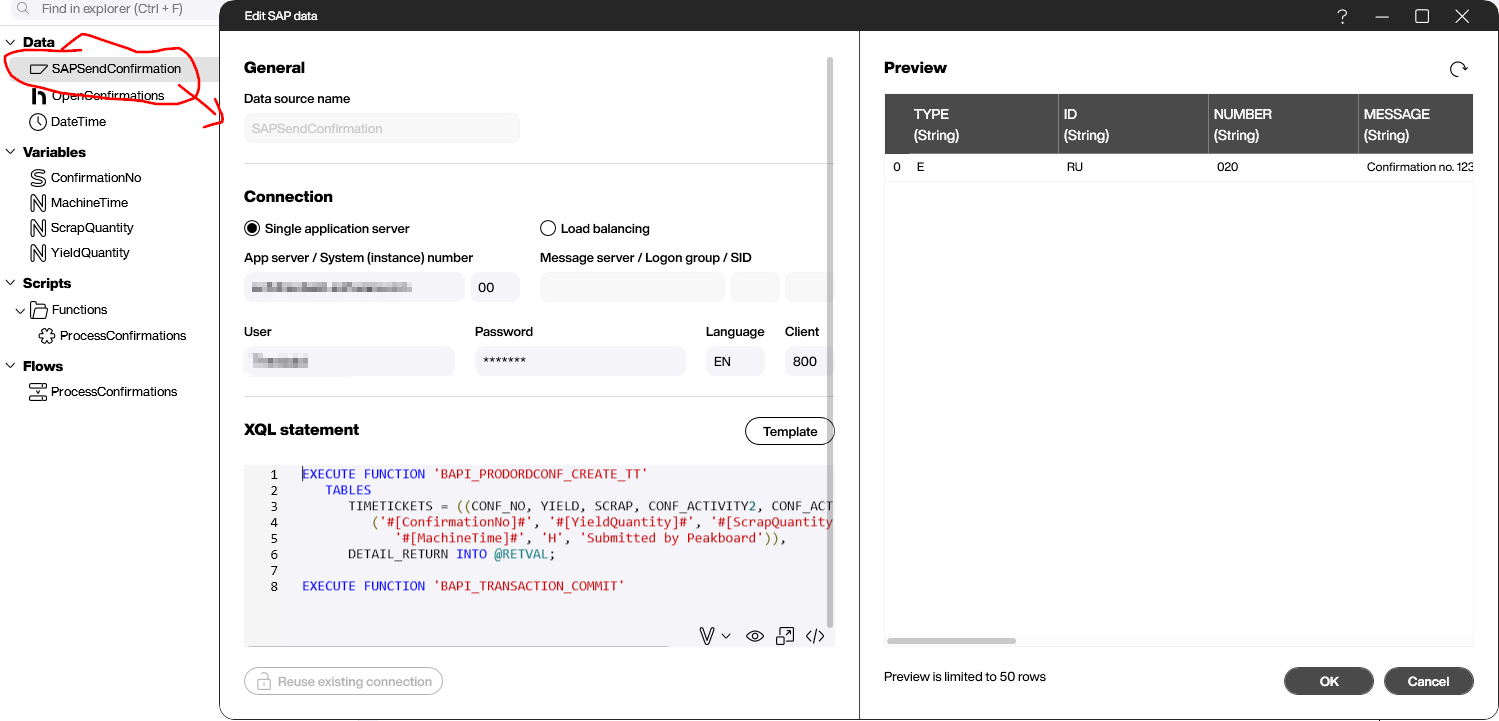
4. Process the confirmations with Building Blocks
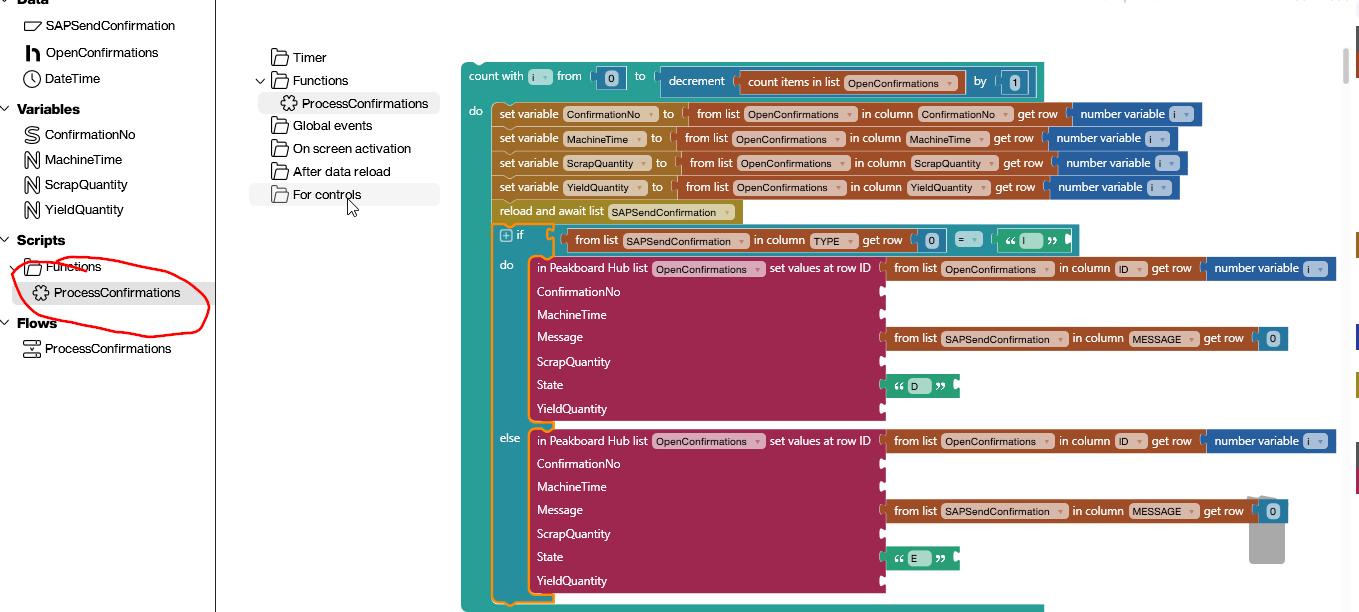
You can build the ProcessConfirmations function with Building Blocks. It loops over each row of OpenConfirmations:
- The four variables are set to the values in the row.
- “reload and await list” reloads SAPSendConfirmation: the request goes to SAP, and the script waits for the response from SAP.
- If the
TYPEcolumn in row 0 of SAPSendConfirmation containsI, the confirmation succeeded and the row gets the stateD. In all other cases, it gets the stateE. - The “set values at row ID” block writes the state and the message from the
MESSAGEcolumn to the matching row of the Hub list, identified by itsIDcolumn.
5. Set up the trigger and upload the Hub Flow
With a periodic trigger, you can start the ProcessConfirmations Hub Flow every 60 seconds. On each run, the OpenConfirmations data source is reloaded first, followed by the function. The “Data change” condition between the two steps means that the function only runs when the data has changed. After the upload to Peakboard Hub, the Hub Flow runs at the set interval.

In Peakboard Hub, you can see under “Hub Flows” when the Hub Flow last ran and whether each step was successful.

The result
After the first run, one confirmation has been submitted to SAP successfully, and the other one has come back with an error. It is sent again as soon as the list of open confirmations changes, for example when a new confirmation arrives.
To keep the example simple, it has no complex error handling and just sends failed confirmations again. You can extend the pattern with a counter, for example: if a confirmation fails 10 times, the retries stop and the person in charge receives an email. You could also send an email for any error.
Further reading
You can download the Flow project SAPProdOrderConfQueueing.pbfx and open it in Peakboard Designer. The SAP data connection page explains how to connect SAP in Peakboard Designer.
Free trial
Try Peakboard Hub for free
Hub Flows are included without limits in the 60-day Peakboard Hub trial, so you can rebuild the example from this article right away.

Why send confirmations through a message queue?
The application only waits until the confirmation is stored in the Hub list, so it stays responsive. The Hub Flow takes care of sending, status tracking and retries on errors.
How does the Hub Flow know which confirmations are open?
Through the State column. The data source filters all rows where State is not D, meaning new confirmations (N) and failed ones (E).
Which SAP function does the example use?
The XQL statement calls BAPI_PRODORDCONF_CREATE_TT followed by BAPI_TRANSACTION_COMMIT. The DETAIL_RETURN table returns the status and message from SAP.
What happens to failed confirmations?
They get the state E and the message from SAP. The Hub Flow sends them again as soon as the list of open confirmations changes, for example when a new confirmation arrives.
What data does a confirmation contain?
The confirmation number ConfirmationNo, the yield quantity YieldQuantity, the scrap quantity ScrapQuantity and the machine time MachineTime. The Hub list also has the columns State for the status and Message for the response from SAP.