What Is SCADA? How It Works, and How It Differs from MES, PLC and HMI
SCADA supervises industrial processes from a central point. What it is not, is the system that controls your machine, runs your orders, or drives your operator panel. Here is the whole landscape, sorted by the question each system answers.
30.01.2025
·
10 min read
- SCADA stands for Supervisory Control and Data Acquisition. It acquires, supervises and archives process data across many assets and sites, and raises alarms when values leave their limits.
- Four components make up practically every SCADA system: sensors and actuators, RTUs and PLCs, the communication network, and the HMI.
- SCADA does not control the individual machine — the PLC does. An MES runs orders rather than process values, and an HMI is an operator panel rather than a team dashboard.
- SCADA was designed for isolated networks. Connecting it to IT systems is what widens the attack surface, which is why read-only interfaces and network segmentation matter.
- Peakboard is not a SCADA system. It reads from SCADA, PLCs, MES and ERP and puts that data where the work happens — without writing to the control system.
What is SCADA?
SCADA stands for Supervisory Control and Data Acquisition. It is a system designed to monitor, gather and analyze real-time data from industrial equipment and processes, and to control that equipment from a central point.
SCADA combines hardware and software. Field devices such as sensors and actuators are connected to a control system that gives operators centralized oversight: live values, historical trends, and an alarm when something leaves its limits. The word supervisory is the important one. A SCADA system supervises processes that are themselves controlled by equipment one level below it.
How a SCADA system works
Practically every SCADA system is built from the same four components.
1. Sensors and actuators
Sensors collect data such as temperature, pressure and flow rates from the process. Actuators carry out the resulting actions — opening a valve, adjusting a drive — based on commands or predefined rules.
2. RTUs and PLCs
Remote Terminal Units and Programmable Logic Controllers sit between the field devices and the control system. They collect and pre-process data at the edge of the network before relaying it, and they keep working when the connection to the center does not.
3. Communication network
The network moves data between field devices and the central system. In practice this means Ethernet, cellular or radio links carrying industrial protocols — OPC UA and Siemens S7 around machines, Modbus in mixed installations, DNP3 and IEC protocols in remote telemetry.
4. Human-Machine Interface (HMI)
The HMI presents the collected data in a form an operator can act on: real-time visualization, trend analysis and alarm handling for the equipment being worked on. It is the screen through which the process is supervised and operated.
What a SCADA system actually does
Components describe how a SCADA system is built. Its functions describe what it is for:
- Data acquisition. Reading process values continuously from field devices, at the rate the process demands.
- Supervision. Presenting the current state of many assets in one place, so a small team can oversee a large installation.
- Control. Sending setpoints and commands back down to the equipment, within the limits the underlying controllers enforce.
- Alarming. Detecting when a value leaves its limits and notifying whoever needs to act, with acknowledgement and escalation.
- Archiving and reporting. Storing the history so that a fault can be reconstructed afterwards and long-term behavior can be analyzed.
SCADA vs. MES vs. PLC vs. HMI: the whole landscape
Most of the confusion around SCADA comes from neighboring systems that do adjacent jobs. The useful question is not which system is better, but which level answers your question. In one line each, from the machine up to business planning:
- PLC runs one machine.
- DAS records measurements and nothing else.
- SCADA supervises many assets.
- DCS regulates one continuous process.
- HMI is the operator's screen on a machine.
- MES runs orders.
- ERP plans the business.
What each of those means in practice:
PLC — Programmable Logic Controller
Field level. Controls the machine itself — cycles, valves, drives. RTUs do the same job at remote sites where a cable run is not practical.
Answers: “What should the machine do in the next cycle?”
Where Peakboard fits: reads values over Siemens S7, OPC UA or Modbus — without writing to the control system.
DAS — Data Acquisition System
Field level. Records, digitizes and stores measurements. No operator screen, no alarming, no intervention in the process.
Answers: “What values were present at what point in time?”
Where Peakboard fits: can read the same values and make them visible, instead of only filing them away.
SCADA — Supervisory Control and Data Acquisition
Supervisory level. Acquires, supervises and archives process data across many assets and sites, and raises alarms when values leave their limits.
Answers: “Is the process within limits — and where do I need to step in?”
Where Peakboard fits: brings control room data out to the workplace on the shop floor.
DCS — Distributed Control System
Supervisory level. Regulates continuous processes in chemicals, pharma or energy — more tightly coupled than SCADA, and less distributed.
Answers: “How do I keep a running process stable?”
Where Peakboard fits: same as with SCADA — reads along, displays, does not control.
HMI — Human Machine Interface
Operator level. The operator interface at or near the machine — the panel the machine is actually run from.
Answers: “What is this one machine doing right now?”
Where Peakboard fits: also a visualization layer — but for the team and the floor, not for safety-related machine operation.
MES — Manufacturing Execution System
Execution level. Runs production: orders, confirmations, quality, OEE and traceability.
Answers: “Which order is running where — and how far along is it?”
Where Peakboard fits: reads MES data and puts order and progress right at the line.
ERP — for example SAP
Business level. Plans the business: materials, dates, inventory, cost.
Answers: “What makes economic sense to do next?”
Where Peakboard fits: native SAP connector — inventory and orders on the board without a detour.
These levels follow the classic automation pyramid. In plants that grew over time the boundaries are blurrier than the list suggests — what stays decisive is the question a system is meant to answer.
SCADA vs. MES: the most common mix-up
Both systems collect data from production, both show downtime, both produce reports. The difference lies in the subject matter and in the time scale.
SCADA thinks in process values and in seconds. Level, pressure, temperature, speed, limit violation. It answers whether the physical process is running within its limits, and archives that history.
MES thinks in orders and in shifts. Which production order is running on which resource, how many good parts have been confirmed, which batch went into which lot. It answers whether production is hitting its targets.
As a rule of thumb: if the subject is a physical measurement, it is SCADA. If it is orders, quantities, quality and traceability, it is MES. The two do not replace each other — in many plants they run side by side and exchange data.
SCADA vs. PLC and DCS: where control ends
These three sit closest together technically, because all three can genuinely control something. What separates them is scope:
- PLC — one machine. Deterministic, in the millisecond range, wired directly to sensors and actuators.
- DCS — one process. Tightly coupled regulation of continuous operations, usually inside a single plant, with high availability requirements.
- SCADA — many assets. Supervision, alarming and archiving across lines, buildings or sites; the actual control stays with the PLCs underneath.
Put shortly: a PLC runs a machine, a DCS runs a process, and SCADA oversees many of both.
SCADA vs. DAS: data acquisition is not process supervision
The dividing line here is intervention. A DAS is at home on test benches, in labs and in measurement campaigns, where clean raw data matters and operating the process does not. As soon as someone is expected to watch, acknowledge and step in at a screen, we are talking about SCADA. Put differently: every SCADA system contains data acquisition, but not every data acquisition system is a SCADA.
HMI or dashboard: two screens, two jobs
An HMI belongs to the machine. It is built for the operator standing in front of it, is often safety-related, forms part of the machine documentation, and deliberately shows only that one machine. That is its strength — and its limit.
A shop floor dashboard has a different audience: the shift, the team, production management. It aggregates across several machines, puts numbers in context and supports decisions rather than operation.
The mix-up is expensive, because it leads to the conclusion: “we have HMIs everywhere, we can see everything.” What is visible then is each machine on its own — and the state of production as a whole nowhere.
SCADA security: what changes when OT meets IT
SCADA systems belong to operational technology, and most of the installed base was designed for networks that were physically isolated. Security came from the air gap rather than from the protocol — many industrial protocols still carry no authentication or encryption of their own.
That assumption breaks as soon as the system is connected to IT for reporting, remote access or cloud analytics. The attack surface widens, and it widens on systems that run for decades and cannot simply be patched on a Tuesday. What matters then:
- Network segmentation. Keeping OT and IT in separate zones with a controlled boundary, so a compromised office network does not reach the process network.
- Access rights. Individual accounts instead of a shared operator login, and rights that end where the person's job ends.
- Read-only wherever possible. Every system that only needs to display data should only be able to read it. Anything that can write to a controller has to be treated as part of the control system.
- Maintenance and monitoring. Knowing what is on the network, and noticing when something new appears on it.
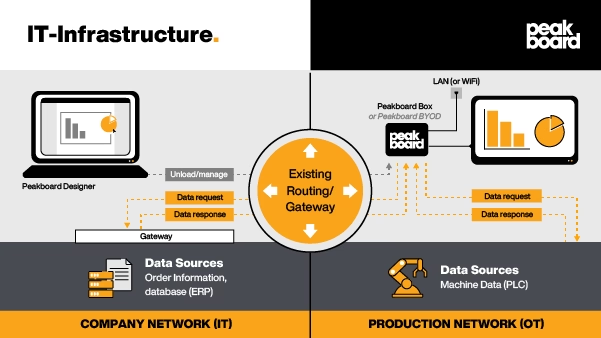
This is also where a visualization layer differs from a second control system. Peakboard reads from the process and never writes back to it, so adding a board to the shop floor does not add control-level risk to the network.
Where SCADA is used
SCADA runs anywhere a small team has to oversee a large or distributed installation:
- Energy and utilities — power grids, distribution, wind and solar assets.
- Water and wastewater — treatment plants, pump stations, distribution networks.
- Oil, gas and pipelines — remote sites connected by telemetry rather than cable.
- Manufacturing — production lines, equipment efficiency, unplanned downtime.
- Food, beverage and pharma — continuous processes under documentation requirements.
- Buildings and HVAC — heating, cooling and refrigeration across a site.
- Transportation — traffic signals, rail networks, airport logistics.
What programming skills do you need?
For a classic SCADA or HMI project: quite a few. Vendor engineering tools come with their own scripting languages, tag and point lists, and their own project model. In many plants an external integrator therefore handles the implementation — and every later change as well.
None of that applies to the visualization layer above it. Peakboard requires no programming knowledge. Screens are built in Peakboard Designer by drag and drop, and data sources are connected rather than coded — including OPC UA, Siemens S7 and SAP. In practice, that decides whether a change is made in the plant itself or turns into a ticket with a service provider.
Where Peakboard fits into this landscape
Peakboard is not a SCADA system, and it replaces neither the control system nor the safety functions of a machine. Peakboard is the visualization and interaction layer above them.
In practice that means Peakboard reads from PLCs, SCADA, MES and ERP, brings that data together and puts it where the work happens — at the line, in the warehouse, at the packing station. More than 100 data connections are available for this, among them OPC UA, Siemens S7, MQTT, Modbus, Beckhoff TwinCAT, Rockwell, Kepware, SQL databases and a native SAP connector. Nothing is written back to the control system: Peakboard reads along and displays.
See it on your own data
Machine data on the shop floor — without a SCADA project
In a personal demo we connect Peakboard to a data source you already run and show what a board looks like on your process. Thirty minutes, no preparation needed.

Frequently asked questions about SCADA
What does SCADA stand for?
SCADA stands for Supervisory Control and Data Acquisition. It describes systems that acquire, supervise and archive data from industrial equipment and processes from a central point, and raise alarms when values leave their limits.
What are the components of a SCADA system?
Four: sensors and actuators in the field, RTUs and PLCs that collect and pre-process their data, a communication network carrying industrial protocols such as OPC UA or Modbus, and an HMI through which operators supervise and operate the process.
What is the difference between SCADA and MES?
SCADA supervises the physical process in real time — measurements, limits, alarms — and archives that history. MES runs production along orders: confirmations, quantities, quality, traceability. SCADA works at the supervisory level, MES at the execution level. Neither replaces the other, and in many plants they run side by side.
What is the difference between a PLC and SCADA?
A PLC controls one machine directly, deterministically and in the millisecond range. SCADA supervises many machines and sites, collecting their data, raising alarms and archiving history — while the actual control stays with the PLCs underneath. A SCADA system without controllers below it has nothing to supervise.
Is an HMI the same as a SCADA system?
No. An HMI is the operator interface of a single machine and addresses the person standing at it. SCADA supervises many assets centrally and addresses the control room. An HMI can be part of a SCADA system — the reverse does not hold: an HMI does not turn a machine into a SCADA.
What is a DAS?
A data acquisition system records measurements, digitizes them and stores them — without an operator screen, alarming or intervention in the process. It is used mainly on test benches, in labs and in measurement campaigns. As soon as operating, alarming and intervening are involved, the system is a SCADA.
How secure are SCADA systems against cyberattacks?
SCADA belongs to OT and was largely designed for isolated networks, so many industrial protocols carry no authentication of their own. Connecting to IT widens the attack surface on systems that run for decades, which is why network segmentation, individual access rights and read-only rather than write interfaces matter. A visualization layer that only reads, and never writes to the control system, does not add control-level risk.
What programming skills do I need for SCADA systems?
For engineering and modifying a SCADA system, substantial ones: vendor engineering tools, scripting languages and tag lists. For the visualization layer above it, none — Peakboard requires no programming knowledge. Screens are built in Peakboard Designer by drag and drop, and data sources are connected rather than coded.