DISPLAYS ON SITE
1 Display
EMPLOYEES
18
Data sources


1 License
One license per display

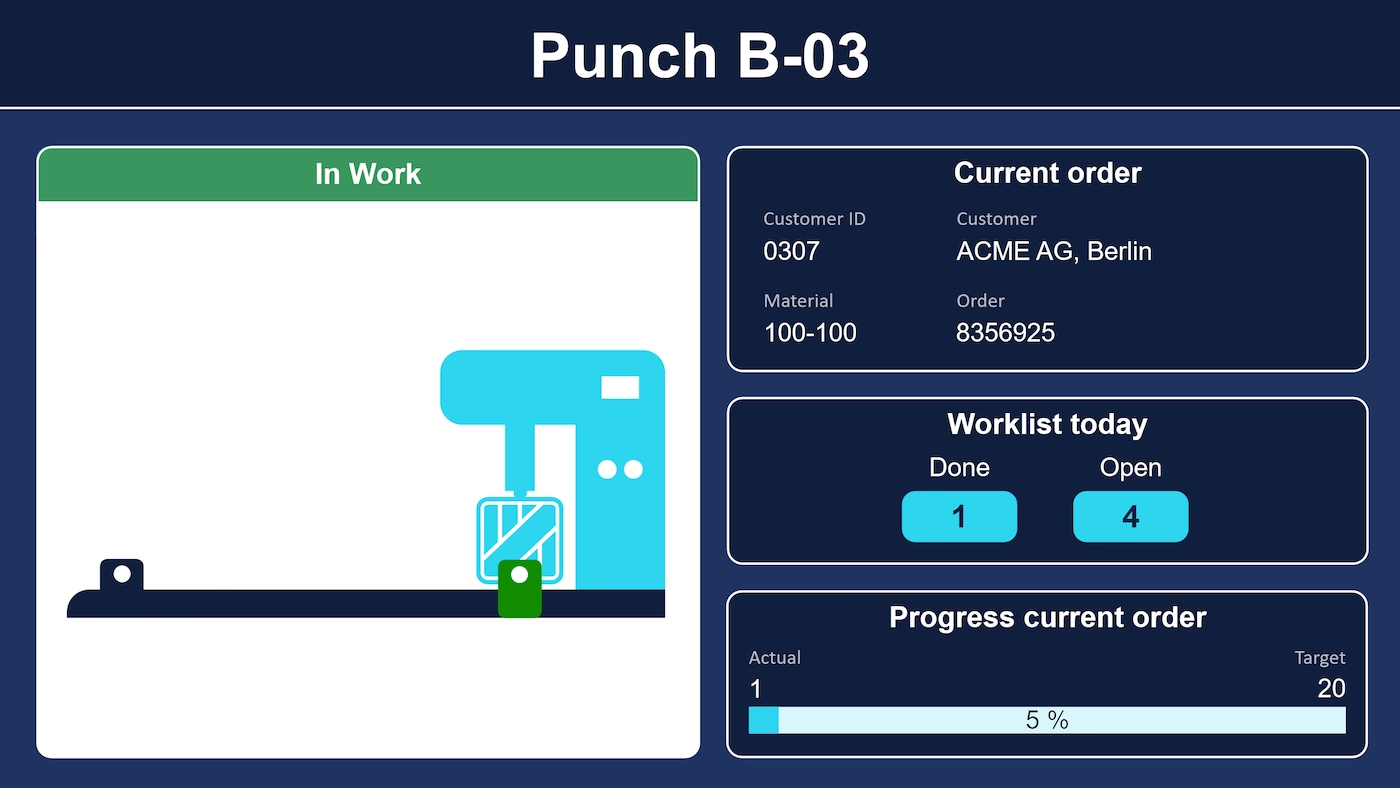
The Siemens S7 dashboard from Peakboard maps a punching machine onto the screen: the light barriers show where the workpiece currently sits, and the punch head moves along with the stamping cycle. Alongside are the current order, the day's workload, and the progress – plus a status field that reports “in operation” or “fault” through a connection watchdog.


The machine state sits in the controller.
The order data sits in the ERP.
Anyone who wants an order's current state has to look in two places.
Native SAP connector, OPC UA, MQTT, and dozens of other sources are available out-of-the-box. You just connect, instead of integrating – and the data appears directly at the shop floor.


%201.svg)


%201.svg)


A different machine, an extra interface, another metric – thanks to the low-code editor and Peakbot, you can adapt the dashboard yourself, no coding skills required.
Whether on the Peakboard Box or your own hardware – both run 100% on-prem, with no single point of failure and no cloud dependency.
Device-based pricing instead of user-based licenses: one license per display, unlimited users per device. More staff on the same display cost nothing extra.



Connecting a machine with Peakboard shouldn't take a year. With Peakboard, you start right away – no appointment, no major IT project.



Start Immediately · No Appointment · Free
If you need support: You'll find tutorials and step-by-step guides on our Helpsite and our YouTube channel. For individual needs, we offer workshops and consulting.
In conversation · With experts · 55 min.
Discuss your specific use case with an expert – briefly provide information about your use case beforehand, and we'll get straight to the point.
You'll get a complete overview of all features and see what's possible with Peakboard in your environment.

The data comes through the S7 data source, refreshed every second: bits for the light barriers and the position of the punch head, counters as integers. The order data is sample data in the template and can be connected from an ERP system such as SAP. The template only works together with an S7 controller.
The same connection can be applied to further machines. How that grows into continuous monitoring of the whole machine park is covered on the page about machine monitoring software.
No. The template only works together with a real Siemens S7 controller and serves as an example of such a connection.
How you set up communication between Peakboard and a punching machine via a Siemens S7 controller and display the machine's data on a screen.
The machine status, the current order with customer and material, and the completed and open work orders with their progress.
In principle yes – this template, however, only reads the data and writes nothing back.
Yes. The example serves as a template for your own Siemens S7 connections – regardless of the specific machine.
Besides Siemens S7, Peakboard supports numerous other interfaces such as OPC UA, MQTT, Azure Event & IoT Hub, Mitsubishi Electric, Beckhoff Automation, Bosch IoT Gateway, Rockwell Automation, or MT Connect.
Peakboard runs entirely on-premises on your own network – machine data never leaves your company. There's no cloud requirement, no single point of failure, and you keep full control over your infrastructure.