How to Collect Machine Data: Methods, Interfaces and Getting Started
The methods for capturing machine data, which interfaces are supported and how Peakboard brings machine data into dashboards in real time.
02.07.2026
·
8 min read
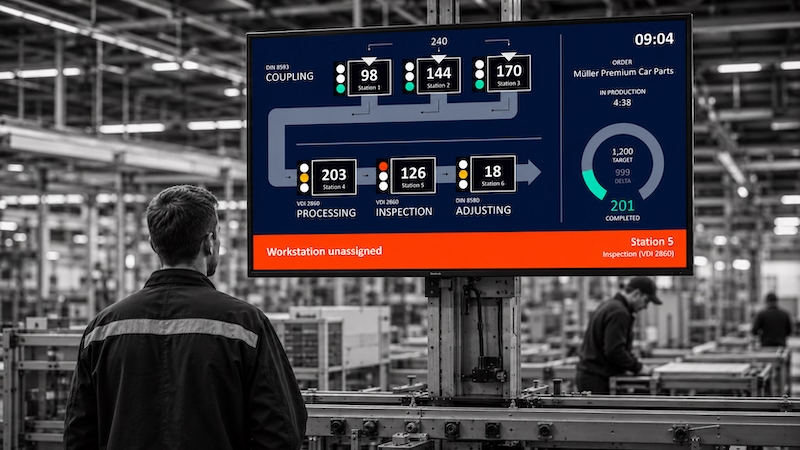
- Machine data can be captured via PLC interfaces (OPC UA, MQTT, Profinet), external sensors or manual operator input.
- Modern machines deliver data directly through standardized protocols such as OPC UA – older equipment via power sensors or serial interfaces.
- Peakboard connects to over 100 data sources and processes machine data in real time without its own database.
- No IT project required: Peakboard is live in a few days, on existing hardware.
Peakboard connects directly to the machine controller – PLC, OPC UA, MQTT or serial interface – and brings machine data into a dashboard in real time, without anyone having to type in a value. That is digital machine connectivity: no manual data capture, no delay, no data lost between machine and system.
What is machine data?
Machine data is every signal and state a machine produces during operation: operating status (running / stopped / fault), cycle count and speed, counter values and quantities produced, fault messages and error codes, temperature and pressure values, tool wear and maintenance intervals. This data sits inside every modern machine – but without a connection it stays invisible.
Methods for connecting machines
OPC UA
OPC UA (OPC Unified Architecture) is the industry standard for machine-readable data communication. Modern machines from Siemens, Beckhoff, Allen-Bradley and other manufacturers support OPC UA natively. Peakboard reads OPC UA data directly, without middleware. How the connection is set up is described under the OPC UA data connection.
Direct PLC access
For older Siemens controllers (S7-300, S7-400, S7-1200, S7-1500), Peakboard offers direct access via the S7 protocol – without an OPC UA server and without additional software on the PLC.
MQTT
MQTT is a lightweight messaging protocol used above all in IoT environments. Peakboard can act as an MQTT subscriber and receive machine data from any MQTT broker.
External sensors for older machines
Not every machine has a modern controller. For older equipment without a digital interface, external clamp sensors can measure power consumption and derive whether the machine is running or stopped. The sensors sit on the outside of the cable and do not intervene in the machine controller.
Manual operator input
For information no machine supplies automatically – for example the fault reason or scrap cause – Peakboard offers a touch input area right on the display. The operator adds context without a paper form and without switching systems.
Typical machine data at a glance
- Operating status: running / idle / fault / maintenance
- Counters: parts produced, scrap, good parts
- Times: cycle time, operating time, downtime
- Process parameters: temperature, pressure, speed, feed
- Maintenance: operating hours since last service, next service date
From machine to dashboard
Machine data on its own has no value. It only pays off once it is visualized in a dashboard, aggregated in a production monitoring system and converted into KPIs such as OEE. Peakboard handles all three steps: connection, processing and visualization in one system – without a separate database, without an IT project.
What a finished application looks like is shown by the interactive PDA dashboard: operating data is captured both manually and automatically, and production data and quality parameters appear in real time on one central dashboard. Which of these routes suits which machine, and what happens to the data once it is on the display, is set out on our overview of machine monitoring software.
Data connections
All machine data interfaces at a glance
PLC, OPC UA, MQTT, S7 and over 100 more data sources – Peakboard connects your machines directly, without middleware.

Which interfaces does Peakboard support for machine data?
Peakboard supports OPC UA, MQTT, Siemens S7 (direct), MTConnect, serial interfaces, and external power sensors for older machines without a digital interface.
How are older machines without a PLC connected?
External clamp sensors measure power consumption and derive whether the machine is running or stopped. The sensors sit on the outside of the cable and do not intervene in the machine controller.
Is machine data stored?
Peakboard can write data to a SQL database, a data warehouse or a cloud solution. For real-time visualization no database of your own is needed.
What is OPC UA and why does it matter?
OPC UA is the most important open communication standard for industrial automation. It enables vendor-independent, secure data transfer between the PLC and higher-level systems such as Peakboard, without middleware.
Do I have to modify the machine controller?
With OPC UA or S7 direct access only a connection is configured, no intervention needed. With clamp sensors for older machines a sensor is attached to the outside of the power cable – also non-invasive.
Can machines from different manufacturers be combined in one dashboard?
Yes. Peakboard supports mixed machine parks: Siemens, Beckhoff, Allen-Bradley, and older equipment without a PLC – all in one dashboard, one unified overview.